Subscription
Manage your subscription plan, add-ons, billing details, and payment method.
Accessing Settings
- Log on to Chillhub App
- Open the user menu
- Located on top right of the app toolbar
- Navigate to the Settings menu.
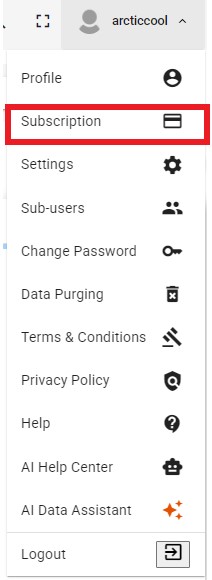
- Note: Billing, Card Payment, and Cancel Subscription sections are not shown for self-hosted deployments. Only add-on selections (Sub-users, Advanced Capability Bundle, AI Productivity) are configurable, as billing is managed separately for self-hosted installations.

Subscription Plan
- Standard Plan: RM59/month. Includes Invoicing, Job Scheduling, Quotation, Expenses, Delivery, Credit/Debit Notes, Sales Order, Purchase Order, Inventory, Accounting, and Payment.
Add-On: 10 Sub-users
- Add additional sub-user logins in blocks of 10, at RM20/month per block, with role-based access control to manage permissions efficiently.
- Add-On Qty: Use / to adjust the number of blocks purchased.
Shows “Up to X users” based on the quantity selected (Qty × 10). - Note: A sub-user can also be configured as an API Key instead of a regular login, allowing external systems to communicate with Chillhub programmatically.
Add-On: Branch Management
- Add additional branches to manage your business operations across multiple locations.
- RM22/month per branch.
- Number of Branches: Use / to adjust the number of additional branches.
Add-On: Additional Scheduling Teams
- 3 teams are included in the Standard Plan. Add more teams in blocks of 10.
- RM15/month per block of additional 10 teams.
- Add-On Qty: Use / to adjust the number of blocks purchased.
Shows Included teams as 3 + (Qty × 10).
Add-On: Multiple Warehouses
- 1 warehouse is included in the Standard Plan. Enable this add-on for unlimited warehouses.
- RM18/month from 1 Jan 2027.
- Enable Multiple Warehouses toggle: Turns this add-on on or off.
Add-On: Cloud Storage
- Securely store all your attachments in a scalable cloud storage system.
- Included in Standard Plan: 5 GB.
- Additional storage costs RM7/month per 10 GB.
- Add-On Qty: Use / to adjust the number of additional 10 GB blocks.
Shows Total Storage as 5 GB + (Qty × 10 GB). - What uses cloud storage: Uploaded purchase invoices, expense receipts, customer digital signatures, job completion notes, and media attachments from scheduled jobs are all stored here.
- Freeing up space: If you're running low on storage, go to User Menu → Data Purging.
- Select a purge date (files older than this date become eligible for removal).
- Under the File Storage section, then check only the specific file type(s) you want to remove.
- : Download the affected files as a ZIP archive before removing them, if you'd like to keep a local copy.
- Confirm to permanently remove the selected files and reclaim storage space.
Add-On: Advanced Capability Bundle
- RM15/month. Enable to activate all of the following together:
- Sales and Service Tax (SST): Apply SST to invoice items and automatically calculate the tax payable.
- UOM Conversion: Maintain precise inventory levels across different units of measure, from boxes to individual pieces.
- Multi-Currency: Issue invoices and receive payments in any international currency.
- Enable Bundle toggle: Turns the entire bundle on or off.
Add-On: AI Productivity (Pay-As-You-Go)
- Experimental – A usage-based add-on covering the following AI features:
- AI Data Assistant: Ask AI questions about your business data (AI Assistant)
- AI Extract Profile: Extract customer & supplier information from text or images
- AI Extract Expense: Extract expense details from receipts
- AI Extract Purchase Invoice: Capture purchase invoice items and pricing
- AI Extract Bank Statement: Reconcile bank transactions in seconds
- 🎁 Enjoy 500 free credits every month for AI features.
- ⚡ Beyond the free tier, usage continues seamlessly at RM0.01 per credit, billed on your next invoice.
- Enable AI Productivity toggle: Turns this add-on on or off.
Monthly Subscription Fee
- Displays the total recurring monthly fee.
- AI Productivity is billed separately based on actual usage and is not included in this fixed monthly total.
- Note: Changing your plan or add-ons mid-cycle may result in prorated charges or credits, applied to your next invoice.
Subscription Detail
- Status: Current subscription status (e.g. active, trialing, canceled), or “not subscribed” if none exists.
- Start Date: The date your subscription began.
- Trial Ends: The date your trial period ends, if applicable.
- Next Billing: The date of your next billing cycle.
- Credit Balance: Any account credit balance available, in RM.
- Authentication Required button: Appears when a pending payment requires additional card authentication (e.g. 3-D Secure). Click to complete authentication via Stripe.
Only enabled when a payment is actually pending authentication.
Referral Program
- Invite friends to Chillhub using your own referral code, or apply a code you received from a friend.
- Benefit: When a referral is rewarded, both you (the referrer) and your friend (the referee) receive account credit equal to the amount of the referee's last paid invoice. The credit is applied to your next invoice.
Your available credit is shown as Credit Balance under Subscription Detail. - Refer a Friend
- Your Code: Your personal referral code. Click to copy it.
- Copy Link: Copies a referral link you can share directly with your friend.
- If you don't have a code yet, enter your own code (up to 20 characters), or click Generate to create a random one, then click Save.
Only available with an active subscription. - Your Referrals: Shows how many referrals are Pending, Rewarded, and Expired.
- A referral becomes Expired if it is not rewarded within 2 months.
- Have a Referral Code?
- Friend's Code: Enter the code you received, then click Apply.
- After a code is applied, this section shows whether your referral is still pending or has been rewarded.
Card Payment
- Update Card checkbox: Enable to enter new card details; leave unchecked to keep your currently saved card.
- When not updating, your current card is shown masked (e.g. xxxx xxxx xxxx 1234).
- When updating, enter your Card Number, Expiry, and CVC via the secure Stripe card fields.
- All payments are securely processed by Stripe; Stripe's terms and privacy policy links are shown below the card fields.
- By subscribing, you acknowledge your subscription will automatically renew and your card will be charged the subscription fee until cancelled.
Cancel Subscription
- Your subscription remains active until the end of the current billing period after cancellation.
- The action button changes based on your current subscription state:
- Cancel Subscription: Shown for an active subscription. Confirms before cancelling at the end of the current period.
- Uncancel Subscription: Shown if a cancellation is already pending. Confirms before stopping the pending cancellation.
- Subscribe Again: Shown if there is no subscription, or it has already been canceled. Confirms before resubscribing.
- Note: This button is disabled while your subscription is in a trial period.